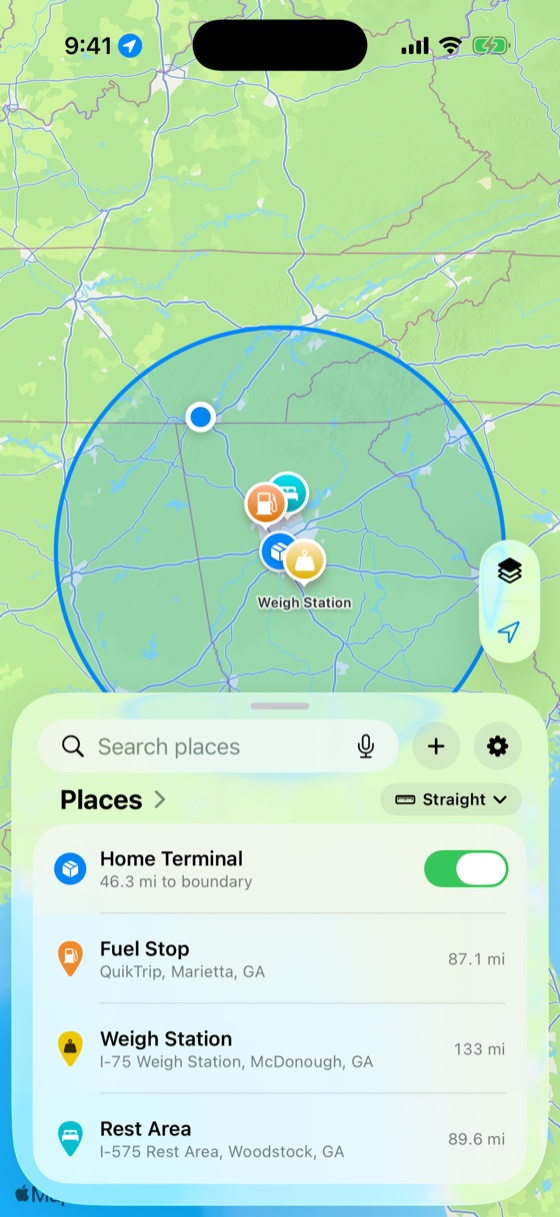
A native iOS radius-alert app that tells you the moment you cross a boundary you set. It has notifications, an event log, and a map-first interface. I designed and built it solo and shipped it to real testers in under a week, and I kept going from there.

The real app, with live radius circles on the map, monitored places, and the Liquid Glass bottom card.
My husband drives long-haul trucks. He depends on a radius alert to stay within the air-mile boundary tied to his agricultural exemption, and the app he was using crashed often and hadn't been updated in years. He needed something he could actually trust on the road.
I'd been wanting to take a product all the way to shipped on iOS, so I used his problem as the vehicle. I built it in the evenings after work and on weekends, went from concept to a TestFlight build in days, and iterated through ten builds in just over a week. Native iOS was new territory, but the platform was the only new part. Turning a vague need into a clear, usable product is what I've been doing for eighteen years.
The hardest part wasn't the design, it was the system underneath it. The monitoring engine had to be built from the ground up, because the platform's standard geofencing isn't meant for distances this large. A map app that deals in distance also has to behave like the real world, so a measurement can't land in the middle of a lake where no one can walk or drive. Tracking, notifications, alerts, and the log all had to work as one coherent system instead of separate features. It also raised questions that sit above design and code, like what happens when someone declines location access, how their data is stored and kept theirs, and what fair monetization looks like for a tool like this. I worked through those myself, and used AI to research and test approaches before committing rather than guessing.
My most valuable tester turned out to be my mom. She found more bugs than everyone else combined, mostly by using the app in ways I never would have thought to design for, with her text size turned up well past anything I had tested. She broke things I would have sworn couldn't break, and kept asking why it didn't handle situations I had never considered. Chasing those down became the part I enjoyed most. Each bug was a small puzzle I hadn't seen coming, and solving it usually meant getting out of my own head and into how someone else actually used the app. That is exactly the kind of feedback you can't get from your own assumptions, and a good amount of the accessibility work, and a couple of features, exist because of her.
The visible product still had to hold a high bar, and that is where my UI and UX experience did the work: a single full-bleed map with one card instead of a tab layout, and a design system that kept everything coherent as the app grew. AI accelerated the build, but it worked inside a roadmap and a set of rules I set up to keep it disciplined. The tools are available to anyone. What they produce depends on the judgment directing them, and that came from experience.

The first five days, by the numbers, straight from the git history and the tester feedback log.
Drop a center point and choose a radius. Milebound checks every GPS fix against every circle and alerts you the moment you cross a boundary, or approach one, with a live readout and an event log.
Apple's region monitoring caps out at 20 fences and about 100 meters, so I built the engine from scratch. It evaluates radii from 0.1 to 500 miles, with an adaptive GPS mode that wakes only when a crossing is close and sleeps the rest of the time to save battery.
A crossing alert on every boundary, plus up to three proximity alerts per place with inside or outside direction, each editable inline. You decide what alerts you and what just gets logged.
A circle's row flags when it overlaps another, and the alerts screen catches alerts that can never trigger, like an inside alert wider than the radius, and offers the fix.
One full-bleed map with a persistent Liquid Glass card that rests at three heights: collapsed status, half, and full. It stays interactive behind the lower detents, and there is no generic tab bar.
Measure boundary-to-boundary with real routing across driving, trucking, cycling and walking modes, and drag the A/B endpoints to re-measure anywhere on the map.
Every crossing is recorded with a filterable history and CSV export, and can optionally write entries and exits straight to your calendar.
The first five days took it from nothing to a build in testers' hands. The log runs to eight because I kept building after it shipped, with several days running from late morning to midnight.
The tracking engine, the full-bleed Maps-style UI, the Liquid Glass bottom card, map modes, settings, onboarding, calendar sync, and the rename to Milebound. It was the biggest day of the build.
A full Dynamic Type + VoiceOver accessibility pass driven by a tester's large-text screenshots, the Places/Activity list redesign, and a tricky UICollectionView crash fix.
Reproduced and fixed a “dead” map button and some travel-mode confusion that testers reported, then shipped a new build.
A rebuilt detail and measure card with boundary-to-boundary distance, on top of the shared gauge design system.
Unified Alerts screen, sub-mile radii, pin-proximity alerts, overlap detection, boundary-accurate copy, and a land-aware distance tool with movable endpoints. This shipped to testers on day five, and I kept going.
A new app icon, a launch sequence, a permission-first onboarding rebuild, first-run map framing, and a logarithmic radius editor, plus the milebound.app marketing site, with a landing page and hosted privacy and terms, all deployed to production.
StoreKit 2, a two-plan paywall with a “Welcome to Pro” flow, the feature-gate layer, full in-app legal docs, and the monitoring-unification work that put pins and circles under one monitor switch.
A full typography, color, and spacing token pass across every screen, home-screen widgets and a Live Activity for any monitored place, a calendar event picker for each place, and a compact status-banner system. It was the highest-commit day of the build, and I was still going.
Build 7 reached testers on day five. Three more builds followed over the next three days, adding a marketing site, monetization, a full design system, and home-screen widgets. I built all of it solo and native.
StoreKit 2 with an entitlement manager and a feature-gate layer behind a two-plan paywall, a free tier plus Milebound Pro, available lifetime or yearly. There are no accounts and no third-party SDK.
Home-screen widgets and a Live Activity or Dynamic Island tracker that read from your monitored places, showing distance and ETA to the nearest boundary right on the Lock Screen.
Semantic typography, a Dynamic-Type-aware color palette derived from one source, and an 8pt spacing grid, all tokenized in code and migrated across every screen in the app.
milebound.app is a landing page plus a hosted privacy policy and terms, built as a faithful web port of the app's design language, with SEO and a branded social card. It is live at milebound.app over HTTPS.
Pick which places write to your calendar and exactly which events get logged, the crossings in and out plus each proximity alert, mirroring the in-app alerts as a picker.
A SwiftUI launch sequence that dives into the map, a permission-first onboarding flow, and first-run framing that centers the user's own city before the card rises.
These weren't typos. They were subtle, framework-level problems, each one root-caused and written up well enough to hand off cold.
“Invalid number of items in section” during list edits. Root cause: the store mutated synchronously inside UIKit's interactive batch update, so derived rows changed by more than the gesture. Fix: defer write-backs one runloop so SwiftUI diffs cleanly.
✓ Fixed & documentedNew Zone fields made the strict JSON decoder reject older saved files outright, and one unknown field could drop a user's whole library on update. Fix: a tolerant, field-by-field decoder that preserves everything it can recognize.
The marketing icon shipped as opaque art carrying a redundant alpha channel, which Apple forbids, so App Store Connect showed a blank icon. I diagnosed it from the asset metadata and flattened it to opaque RGB, pixel for pixel identical.
✓ Root-caused from metadataTestFlight has no “resolved” state, so I built one: a triage standard, a system-of-record log, and risk tiers from R0 to R3. There were nineteen items from three real testers, each with a root-cause note and the exact commit that closed it.
All native, with no third-party dependencies.
From an empty repository to a working, accessible, tester-validated iOS app in five days, and three builds further by day eight, with monetization, a design system, and widgets. I built all of it solo and native.